GarageBand – Musical Typing Explained March 8, 2008
Posted by PJ in : Composing, Digital home recording studios, GarageBand , trackbackIf you are making music in a mobile envornment (say on your laptop), or if you don’t have access to a MIDI keyboard, you can still program music very efficiently. (But, if you don’t own a MIDI keyboard, you might want to take Connor’s advice here and pick one up.)
In the meantime, you can still create some great tunes in GarageBand by using just the keys on your keyboard. This is called Musical Typing. To get started, open GarageBand and click on Window – Musical Typing or use the shortcut Shift+Command+K. You will be greeted by this window:
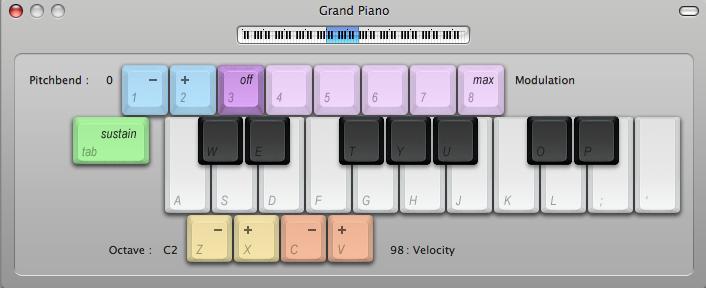
Now your keyboard is mapped to the corresponding keys on screen. In addition to keyboard keys, you also have some other handy controls at your disposal. The 1-2 numbers keys perform a pitch-bend and numbers 3-8 control the modulation value. Holding down the tab key simulates a sustain pedal. The Z and X keys change the octave range you are playing and you can see exactly where you are on an 88-key represented by the highlight blue area at the top of the window. Lastly, you can change your note velocity by using the C and V keys. If you have any questions or comments regarding Musical Typing or GarageBand in general, leave a comment below or email me.
PJ
The Studio Files
Comments»
VERY cool! I had no idea something like that was available. I’ve only used GB once or twice (and it was just as part of a workaround for a bouncing error in Pro Tools), but that’s one hell of a spiffy feature. I have a feeling it’ll come in handy quite a bit in the not-too distant future when I’m hoping to pick up a Mac Book Pro and be composing in random places where breaking out a MIDI controller isn’t going to be very easy. Does Logic have a similar feature?
Thanks Russ! Logic does have a similar feature that can be accessed by pressing the Caps lock key, although the controls are set up a little differently. Keep an eye out for a post explaining music typing in Logic.
There is a little delay by typing those keys. It’s really really drive me mad. Is there any way to change typing delays on GB? Thanks!!!
^^You could lower the buffer size setting for your audio interface (which would require more computer resources, but would reduce this latency)
alright. I been using this crap for a while and makes me say its crap because of lack of support and easy way of getting help. i searched 20 min to find your site and i cant really believe others are not having this issue. yeah i could be an idiot but – logic is simple. I recorded stuff with the musical typing. saved my band file. and then i open it – and i cannot load the Musical Typing. It’s nowhere on my screen. I dont know but it frustrates the hell out of me – I am fairly new user of Macbook and i love the style of programming of most applications with few exceptions (iphoto and now garagaband) – so does that have any explanation – where is the stupid musical typing or keyboard to edit my track..??
Hi
After update from iLife 8 to iLife 9 on my MBP 15″ first generation, Mac OS X 10.6.1, my musical typing and keyboard is inactive, have no sound and cannot press any more. Any one have any idea how to fix this?
I recently got a brand new MacBook Pro. My issues are I can pull up the musical typing window but it is not highlighted thus not allowing me to use it. I have an older version on my iMac that works fine,something has happened and I’m sure it’s an easy fix but I’ve searched everywhere on the net and garageband help with no luck
Is there a way to keep the sustain locked while recording?
is there a way to add one key on the piano to the octavo selection?
to phillip russell i have the same issue have you found a solution yet????? as i need my musical typing as i have no midi interface or keyboard many thanx in advance.
p.s working before 10.6.8 update!!! mybe this is the issue?
Hi – can you step write using musical typing?
Bill
Hey! This is really nice but I have a problem! When select it, it open but I can’t have an direct access… Its foggy! I reallay need help please! Sry, i’m a francophone, my i hope my english is not so bad!
the musical typing window does not highlight and I cannot access the keyboard
I’m trying to use a midi pad as a sound effects machine for a podcast. I’ve already mapped out each sfx for the pad, but I have to hold down ‘tab’ to be able to tap the pad once and let the full sound effect play out. Is there a way to lock the sustain for the SFX track so I can tap the pad once and the full audio file plays out? I also have a keyboard hooked up, and don’t want to lock it for that track.
For anybody whose “musical keyboard” window is greyed out…. you MUST be using the right kind of track for it to un-grey. Make sure when you “add track” you are adding a track that is a “software instrument.” Then it should be active.
musical typing works just fine for my first track. But when I make a second, and pick the sound I want to use, I cant hear a thing. any advice on how to trouble shoot this?
Where are the answers to these questions???
The sound disappears from musical typing for me too.
I cant hear anything from garage band at all. I dont have a midi keyboard and I can hear everything else on my mac. I use the digital keyboard on GB but I cant hear anything in the program at all someone please help.
I downloaded a drum kit with some decent 808 sub sounds, however all of them are in the same pitch. is there any way to take a sample and transpose it on the keyboard so I can play different notes?
To those reporting “greyed out” musical typing window: this is because your software instrument track is locked. To unlock, go to the Track menu -> “Show track lock,” and make sure your track is unlocked by clicking the padlock on your desired track. Enjoy!
How to make musical typing keyboard contain a lower octave also?
can someone post letters to make a song
So I’m having an issue with the musical typing as well. I have a software track selected, and the keyboard window open, but when I type my keyboard changes functions, like opening and closing menus. If I click on the virtual keys, I can hear sound.
how do you use the modulation key on the musical typing. when i use it to record a sound it works, but when i go to play it its a different sound. for example i choose to use violin C# when i play the note its colle styles so i choose to use modulation #4 and it give it a plucking type sound. i like the pluck sound so i record it.. after recording it i go listen to it and the original colle sound note is whats playing.. i just want the pluck sound when i press modulation 4..