Fast Plug-ins in Pro Tools February 17, 2009
Posted by ConnorSmith in : Digidesign, plugins (plug-ins), Pro Tools , trackbackThis is just a little trick in Pro Tools that will make your mixing faster and easier.
We all have our favorite plug-ins (the ones that inevitably end up on a LOT of tracks in most mixes). Even if you are just using the stock Pro Tools plug-ins, changing this preference will make inserting these plug-ins a little faster.
Typically, when inserting (let’s say) a dynamics plug-in onto a track, you’d have to click the insert, scroll through a few menus and pick the one you want.
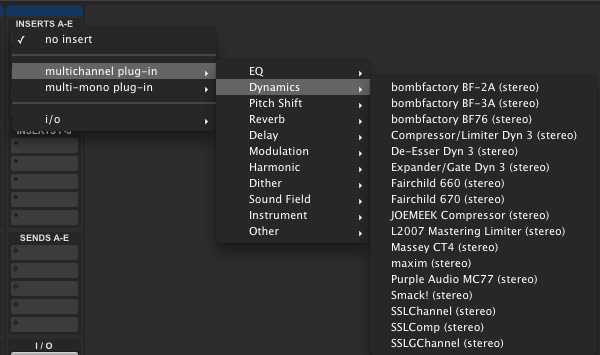
Plug-in selection menu in Pro Tools LE
Pro Tools will let you pre-select a favorite EQ and compressor, putting these two plug-ins in the top menu of of the insert selection. Here’s how you do it.
Go to Pro Tools > Preferences
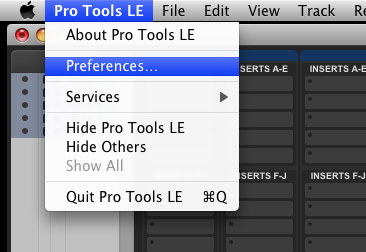
Pro Tools > Preferences
Now go to the “Mixing” tab. In the Setup section, you will see two drop-down menus for “Default EQ” and “Default Dynamics”. Choose your favorite (or most used) plug-ins for these two categories.
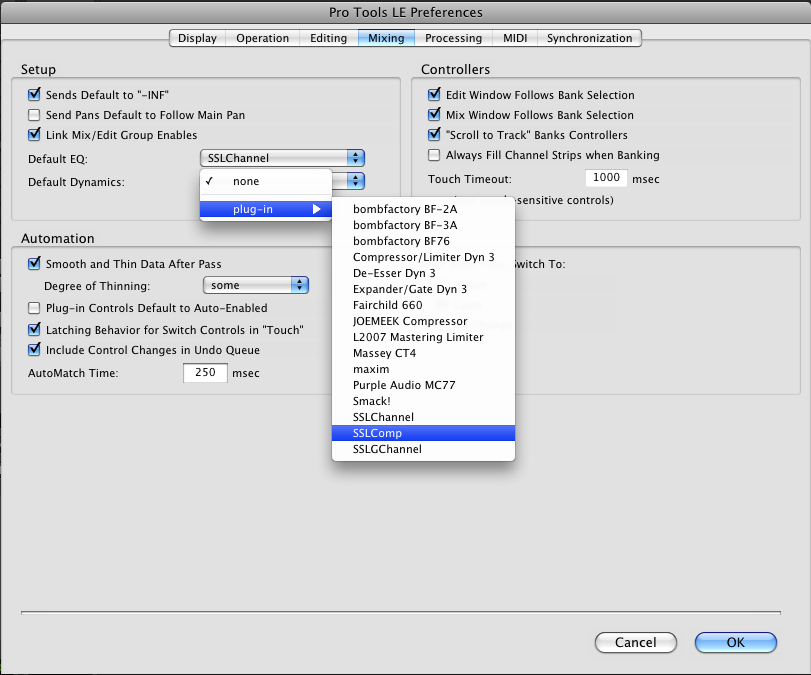
Choose your favorite plug-ins here
Now, if you go back into the mixer window and insert a plug-in, those two plug-ins will be available on the first menu.
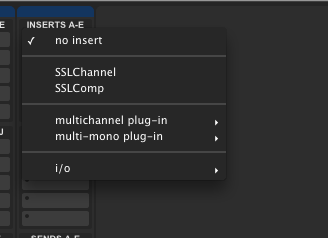
Convenience!
Yes, this is a minor tweak, but over the course of a mix, it can save you a lot of time. Fishing through menus full of plug-ins can be a killer in the middle of a critical section of the song, so having your most-used plug-ins conveniently placed in their own place can help out. (Also, if you are using a control surface with the capability of inserting default EQ and Compression, this is how you set that up as well)
I would highly recommend everyone do this – time=money!
C
The Studio Files
Comments»
Hey man, great tutorials.
I just wanted to add to this that if you hold ctrl (windows) or Command while choosing a plugin, it will be added to your favorites list. Any plugin! Works for Audiosuite too!
Thanks, yeah that was going to be post #2 for this series hah. I’ll probably still do another quick one on it.
Its the little things like this in Pro Tools that really makes me like the DAW.
Don’t know if I’m in the right area but I was wondering if someone had a suggestion on how I can resolve my dilemma. I have PC, AMD X2 2.0 gb dual core processer, windows 7 ultimate 32 bit version, 4 gb of ram ,HD 1.5 Tb and pro-tools 8.0.3(I made the update, I have a mbox2 mini interface). It runs flawless no complaints but where I’m running into an issue is when I attempt to load Battery 3 as a plug in. I follow the steps under inserts A-E(under an aux track) and select multi-channel plug-in but when I go under instruments or other all I get is the plug-ins that came with the update. I got it to work on my laptop which has less resources as far as memory(2gb and 160 gb hard drive) but I have pro-tools and battery on the same hard drive, I tried making the set up the same on my desktop and both battery and pro-tools can open but when I try opening battery through pro-tools it wont locate it. Is there something I’m missing?
any help provided is greatly appreciated.
@Mr.O
To load Battery:
Create stereo instrument track
Go to the pro tools mixer view
Insert A (top slot) choose Multi-Channel Plugin>Instruments>Battery 3
If you’re not seeing it there in the list of instruments then you may have a problem with the installation.
Open NI Service Center (found in your start menu) & make sure that Battery is seen in the list. Check that it is authorized and updated. If it’s not there then you know your problem.
If it is there but not in Pro tools then check that the Battery plugin files are in the Pro Tools Plugins folder.
C://Program files/Common Files/Digidesign/DAE/Plugins
Thanks Jon, I will check this, I truly appreciate the info, will let you know how it goes.
Thanks again
Mr.O
Jon thanks a bunch this site is great. The info you gave me helped me solve my plug-in problem with Battery 3. I’m rolling now
Thanks again and keep up the great work, this website is a very powerful tool, one that I will continue to use.
take care
Omar
Hi Jon-
I was wondering if you can help me out, Im good with Battery 3 showing up in pro-tools but I seem to be having a disconnect somehwere. Im using an Akai LDP8 as a midi controller and for some reason I dont think I have it set up right in pro-tools, It can read it and locate it but when I launch Battery 3 it wont register in battery. Now if I run battery alone (no pro-tools) it works fine. If I use my mouse as apposed to my midi controller it also works fine in pro-tools. For some reason it seems that I dont have the ldp8 set up correcty, any idea?
My set up is as follows
Pro-tools 8
Windows 7 ultimate(32 bit ver)
amd dual core proc 2.0
4 gb of ram
1tb hard drive.
akai ldp8 midi controller
Battery 3
Thanks
Omar
Hey Omar
This actually isn’t my site, I’m not sure where Connor is.
send an email to audiogeekzine[at]gmail.com and I’ll try to help you out with this.
Connor!!!! Where are you!!!!
Hey Jon, thanks Im sending you the email now
Olá ,tenho um mac pro trabalho com protolls LE, instalei um pacote waves 7( waves shells)a instalação foi feita corretamente,a chave de plugin foi para pasta plugin alias do protolls,quando abro o programa ele lê e carrega,mas quando vou ver já com o programa aberto,não aparece os plugins,é um mistério o q será q esta acontecendo será q é o sistema do computador ou protolls?