Use the Official Playstation Bluetooth Headset with GarageBand January 3, 2009
Posted by PJ in : Computers, Digital home recording studios, GarageBand , trackbackThis one is for all my gamers out there that want to maximize the potential of their Official Playstation Bluetooth headset. Not only can you use the headset with your Playstation 3 console and Bluetooth enabled cell phone (such as the iPhone) but you can also use it with virtually any application on Mac or PC (such as GarageBand) that utilizes a microphone.
I copped my headset for cheap in a bundle with Socom: Confrontation** on Amazon by using my favorite website of all time – www.cheapassgamer.com (aside from thestudiofiles.com of course!). The headset is available separately as well.
Pairing your headset in OSX
1. Click on the Bluetooth Logo (  ) on the top right corner of your screen and select “Set up Bluetooth Device.”
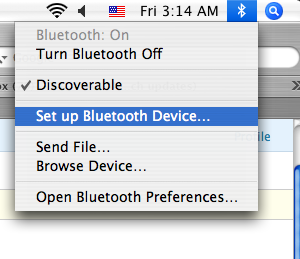
2. On the Welcome screen click continue and then select “Headset” as your device type.
3. With the headset of, hold the power button down on your Playstation headset until the Mic/Mute button flashes red (about 4-5 seconds). The device is now discoverable and should appear on your headsets list. Click continue.
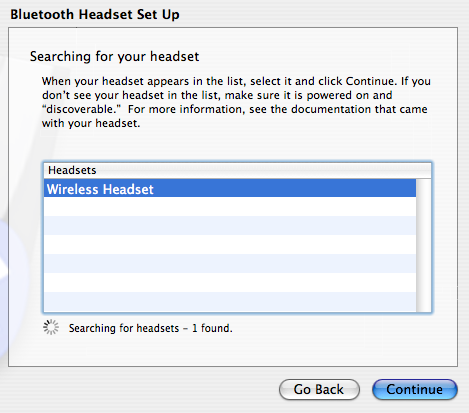
4. Type in the Passkey “0000″ for this device. That’s it!
Enabling the headset in GarageBand
1. Open GarageBand and click GarageBand – Preferences in the taskbar.
2. Under Audio/Midi preferences, click on Audio Input and select your headset from the menu.
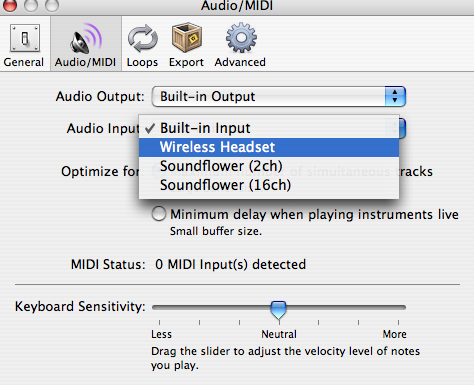
Click Yes when prompted to change the audio driver.
3. Create a New Track – Real Instrument track. You’re done! Now you can record from your Bluetooth headset in GarageBand.
If you would like to see more tutorials like this or have a specific question about GarageBand, Logic and anything music or video game related, shoot me an email or drop a comment below.
-PJ
**Gamers Note: As you may know, Socom shipped in October with a few bugs – a broken matchmaking and stat tracking system for starters, which made the game nearly unplayable. With the most recent patch (version 1.2), most of these problems have been fixed. Luckily, I waited for the update and after about 30 minutes installing and patching the game, I was able to enjoy it as the developers intended. My initial impression of the game is positive – this is Socom on the PS3 and Playstation Network. The gameplay is intact and the headset is essential for this squad based multiplayer shooter.
NOTE 1/4/09: You can also view this article on the Cheap Ass Gamer forums at http://www.cheapassgamer.com/forums/blog.php?b=5389
Comments»
no comments yet - be the first?