Everything about File Compression: Take 6 November 23, 2008
Posted by ConnorSmith in : File Compression , trackbackProblems with lossy (mp3, AAC, Vorbis…) encoders
We’ve established that there are a lot of good things about these encoders (dramatically reduce file size, allowed the internet to be the new battleground for music, etc…).
But what are some problems that these encoders can introduce? Why do they sometimes sound wonky?
This article will be more relevant if you’ve read the other articles on file compression.
I’ll just list major problem areas as headings and then describe them.
Loss of Bandwidth
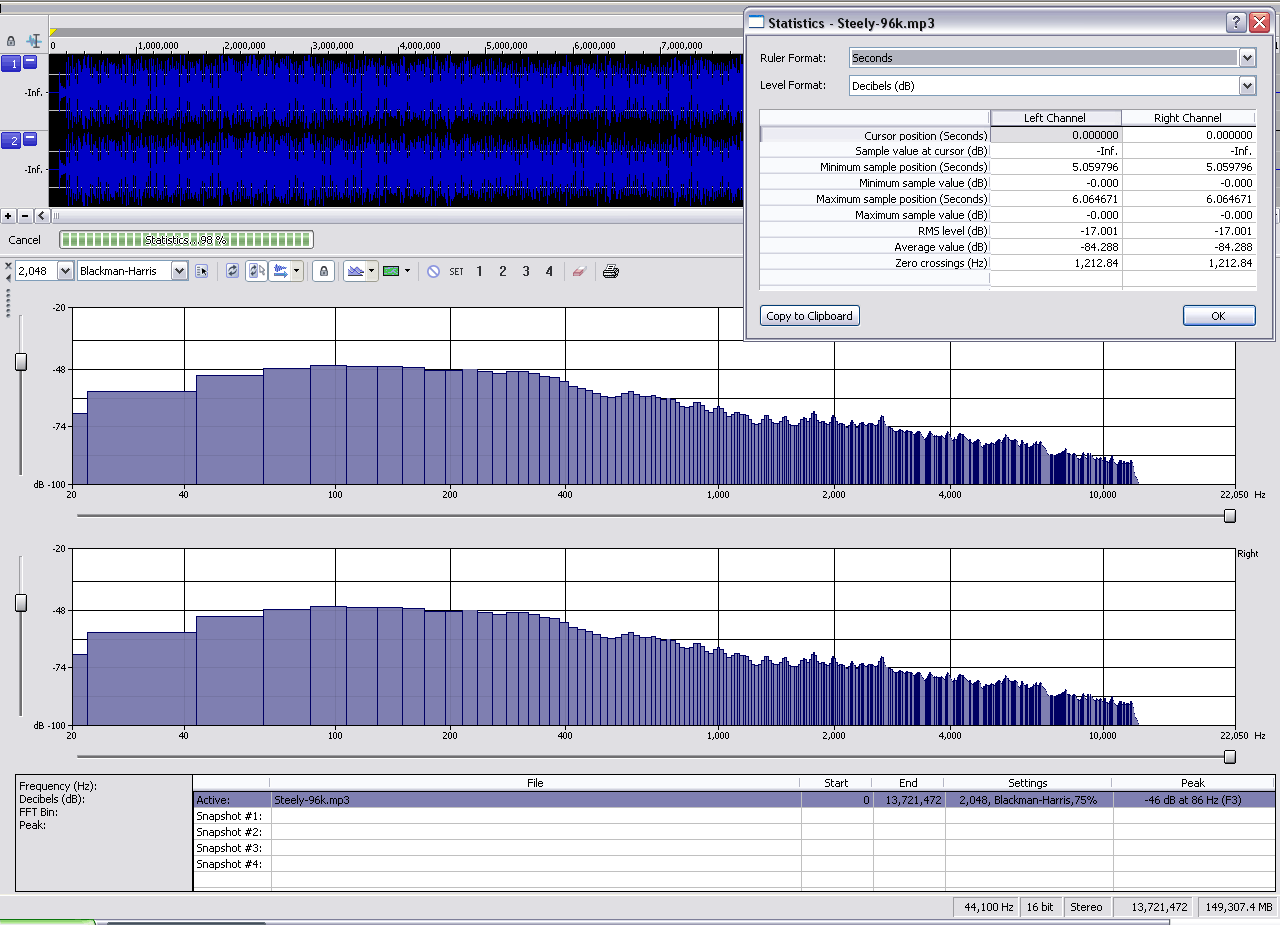
I talked about this a bit int he previous articles. Lossy encoders don’t like encoding high frequency information, as it can take a lot of bits to do so, given the detail of the waveforms. Given the fact that the encoder is limited by its KBPS (kilo-bits-per-second) setting, it needs to adhere to a specific number of bits, no matter what the source material is. When the encoder doesn’t have enough bits to accurately encoder the whole frame, high frequencies are the first to go. Check out the frequency content of this mp3, encoded at 96 KBPS (again from Steely Dan’s Hey Nineteen). Notice how there is nothing above ~12k? (click for full size)
Now, compare that graph to the following one. Below is a 256kbps mp3 of the same tune. Notice how there is more high frequency information present (eyeballing looks like at least 16k or more)
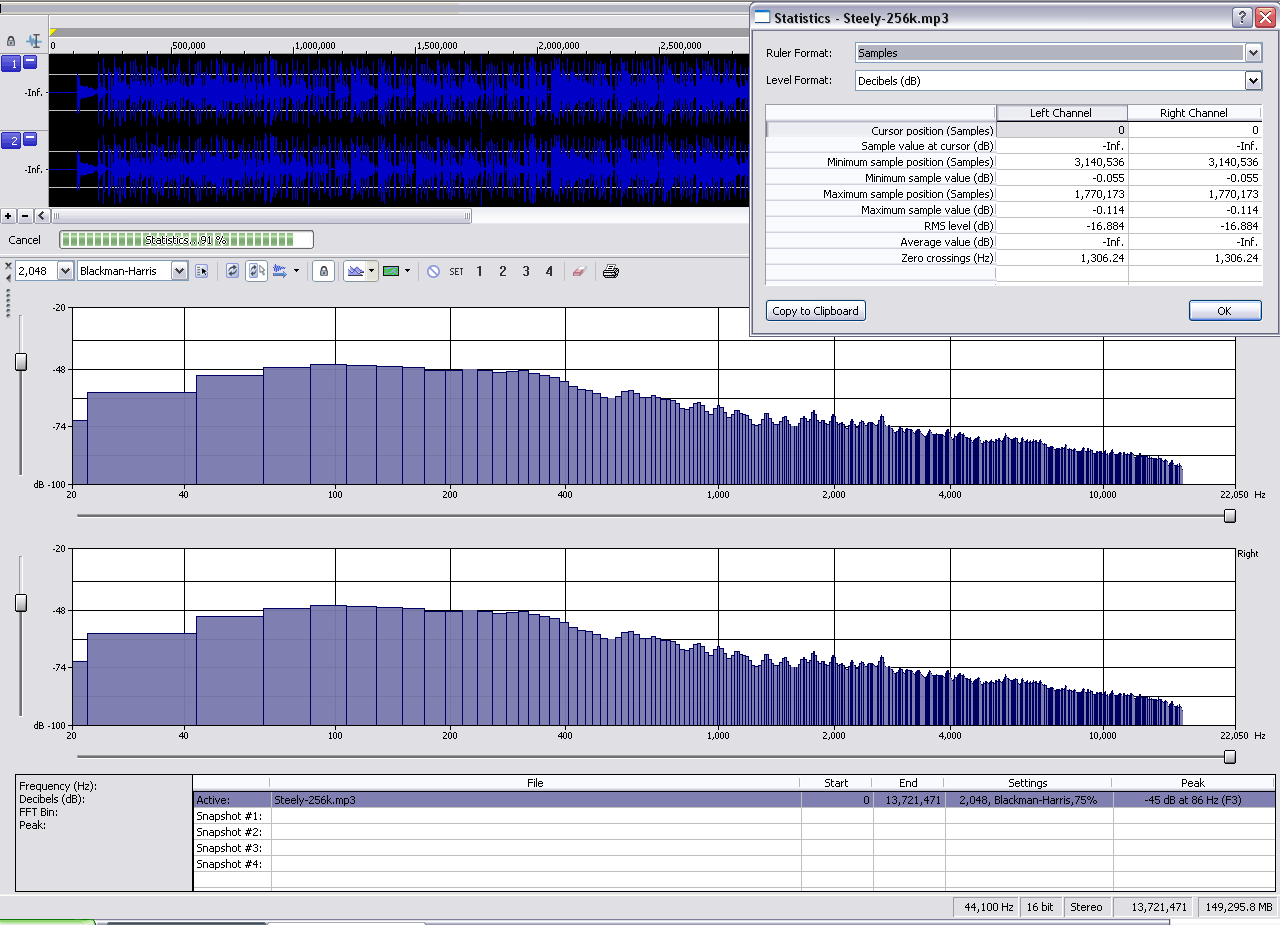
Since the second mp3 has been given more than double the bits per second to encode, it has room for more of the high end goodness.
Pre-Echo
Pre-echo is quite an odd concept. Its probably easier to understand in picture form (below). When a quantizer is working, it is looking at a frame at a time (let’s say maybe 32 milliseconds long, like the picture). When it encodes the quantization (and other) distortion/noise, it somewhat spreads it across the entire frame. In a frame like this with a transient attack (its a castanet), there will be an increase in quantization distortion. But, the transient doesn’t happen until the middle of the frame! So, the quantization distortion it induces can actually be encoded before the transient even happens. Unfortunately this is from an AES paper, and is in black and white (when it should be two different colors). The bottom line is the level of quantization distortion, the top is the rest of the signal (with the castanet transient)
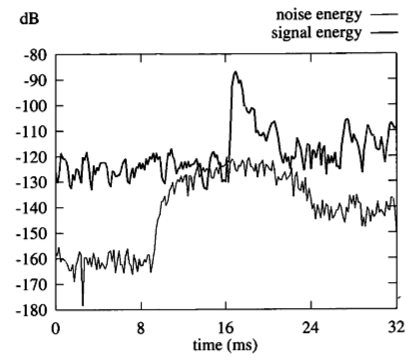
Brandenberg, Karlheinz. AES, 17th International AES Conference, Florence, Italy. MP3 and AAC Explained. New York, NY: AES, 1999
So notice how the noise line increases in amplitude way before the transient occurs. This will sound almost like a reverb (think back to the Ogg Vorbis audio example), but it will happen before the attack of the source. Weird=yes.
Time Smear/Double Speak
I’ll just hit on these briefly, because things start to get really complicated. (When working on a presentation for the Art of Record Production a few weeks back, I found out what “brain tears” were by thinking about this stuff for too long).
Lossy encoders like to move transients around. Assuming we are working with stereo audio (2-channel), the encoder is alot happier if the maximum of a given transient occurs at the same time in the L and R channel, rather than having to remember two different positions for the two channels. Sometimes (especially in lower KBPS settings) the encoder will scoot one channel’s peak over a bit to line up with the other. However, sometimes this shifting causes other parts of the signal to no longer line up. If the encoder doesn’t correct this, then there will be a delay between the R and L channel at that point (which could cause the “double” speak).
Without getting close to “brain tears”, its just good to know that these encoders are moving things in time. This is going to introduce more distortion, leave room for smearing/double speak, alter frequency response/phase, etc…..
In addition to all these^^ problems, more basic problems also occur
- A compressed file can sound “harsh” (also sometimes termed “rough”) because the nature of the noise floor is changing constantly (from encoding window to window)
- It can be noisy! (especially when the encoder fails to lower the level of the noise below the masking threshold induced by the level of the “good” signal)
- Other non-harmonic distortions as a result of all of the above…
This is just an introduction to problems with lossy encoders. I use the word “problems” with caution though. In no way do I mean to say ‘MP3 SUCKS!” etc… These lossy encoders are really great tools for our industry, but it is important to understand what they are doing to the audio and why.
As usual, if there are any questions or need for further explanation, please post in the comments
C
The Studio Files
Comments»
Awesome info C, would it be in an audio engineers’ best interest to make an alternate mix when we know that a song or piece of audio will be converted to MP3, AAC etc?
That^^ is an excellent question.
We know that these encoders don’t particularly like certain things (things like really fast, sequential transients or songs that are slammmmming 0 dBFS the whole time). So it may be possible to try to prevent some of “yuck” that an encoder induces (especially in mastering)
What I do (and would suggest) is that before you bounce out your final AIFF or WAV for mastering, do a quick bounce of an mp3 and listen to that. (Of course, comparing it to an uncompressed bounce). Since you know that your audience will likely be listening in the mp3/AAC format rather than the uncompressed format, it is definitely a good idea to make sure that your song is well represented in the format.
Additionally – if online retailers let you send in your own mp3/AAC files, do it! In a lot of cases, you won’t know what encoders/settings they are using if they rip your CD. If you can send them higher quality compressed audio, and you can verify that it sounds good, then that is definitely a preferable situation.