Everything about File Compression: Take 5 November 19, 2008
Posted by ConnorSmith in : Chit Chat, File Compression, Project Studio , trackbackFLLLLLLAAAAAAAAAAAAAACCCCCCCCCCC
aka FLAC (Free Lossless Audio Codec)
Keyword there being: Lossless! No data is removed from the audio. Let’s dive in…
Again, if you haven’t read Take 1, Take 2, Take 3, Take 4, and VBR, you may want to…
So far, all the compression codecs we’ve looked at are lossy, meaning they actually remove data from the file (and therefore, you could never accurately convert back from the uncompressed file). The other encoders work on the principle of masking and psychoacoustic models, looking to “take out” ot de-emphasize the things humans won’t hear.
FLAC doesn’t. And while similar in some ways, this is a whole different breed of encoder. Plus (like Ogg Vorbis, its open source = FREE)
For starters, FLAC (like the lossy encoders) breaks the signal into smaller pieces. The length of each piece is based on a whole slew of different factors, including dynamic level, spectral content, transients, etc… Now, this is the point where the lossy encoders would start axing (leaving out) things.
FLAC’s goal is to formulate its best prediction of how the signal is acting in the frame. Once it has the best mathematical prediction it can come up with, it compares the prediction to the original, and encodes any differences (called the “residual”). Check out this picture – its a verrrrrrrrry basic representation of what is going on here:
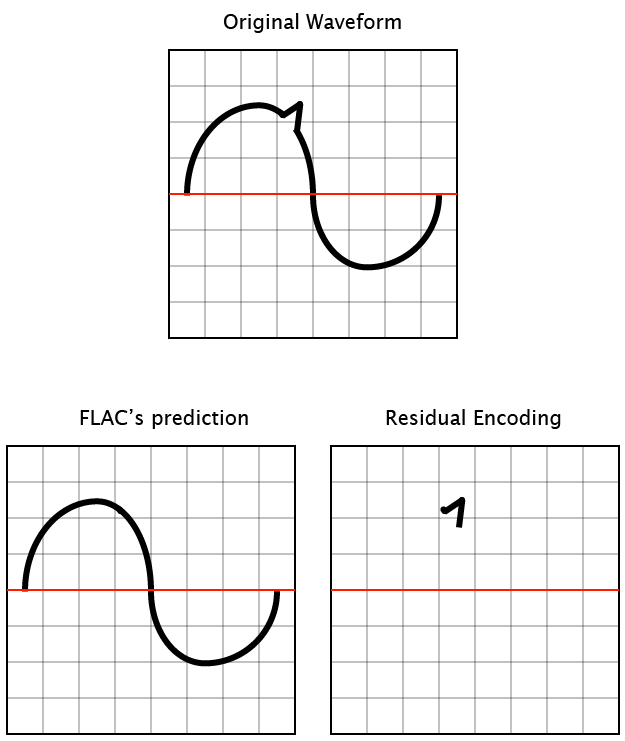
Now, remember that digital audio is a very finite thing. At every given sample point, there are only so many different positions (within the bit depth) that the sample can be at. This is essential to understanding how FLAC could be lossless. If we were dealing with a signal that did not have a finite number of points (aka, analog), this would not work. It could be close, but not completely lossless. By having a mathematical representation of a frame (plus the residual encoding), FLAC can shrink the file size down usually around 30-50% (but more in some circumstances).
When I was first delving into FLAC, I thought “well… how can a compression format that is lossless have different levels of compression??? It must not be lossless…”
It has to do with CPU cycles. When compressing FLAC as much as possible (say you are going for 50% size reduction), the computer will spend much longer trying to predict what the waveform is doing. By getting a more accurate prediction up front, there will be much less residual data to encode. So, the trade-off for a smaller file size is a longer encoding time (and be aware that I have not been able to find a FLAC encoder that can access more than one core of a processor).
That being said, we are only talking a few seconds here. Where an mp3 may encode in 5 seconds, a fairly high compression FLAC might take 25 seconds. If you read Part 4, you will have read the introduction to why open source compression formats aren’t amazingly popular right now… If you google FLAC, you can find a slew of information on encoders, decoders, players, plug-ins… etc. With newer iPods, I’ve heard there’s even a mod you can do to get FLACs to play (although not on the old ones, the processor requirement is too high) – careful though, I’d bet this is not within any limitations of the warranty or user agreement…
So what the heck is FLAC useful for? My first thought would be for archiving mix/mastering files. With 50% reductions on the files, all of a sudden you have to buy half as many backup drives. It’s also useful for sending high quality audio to clients over the internet with less bandwidth (assuming they also know how to procure a FLAC player)
Hopefully we will see FLAC grow in popularity in the near future! More to come soon on these compression formats…
C
The Studio Files
Comments»
no comments yet - be the first?