Composing with Finale® February 9, 2008
Posted by Damon Sink in : Composing, Notation, Virtual Instruments , trackbackThe blank measures stare back at me, defying me, mocking me…
Well, not exactly. But I am getting started writing a piece for piano quintet that I am going to talk about here. Maybe even post snippets. The main thing is to go through the process of using a notation program to create a piece for live musicians to play. For me, this is where music technology started… way back in 1993 when I got my first computer. It was a Centris 650 (Macintosh) with 8 Meg of RAM and a 25 MHz clock, and it cost me about $1700. I was working on several pieces that would be performed on my Master’s recital and I knew I needed to learn this program called Finale. It was only available for the Mac back then (v. 2.6.9). So with the help of my dad and a student loan, I got the computer, a black & white monitor ($399) a Roland JV-90 keyboard ($1500) and a 300 dpi laser printer ($899). I had already learned a lot about Finale by investing in some lessons from a fellow student (Thanks Mark, wherever you are!), and I dove in.
Finale has come a long way since then. Competition from other software like Sibelius has enriched the feature set and made it a much easier program to learn and use than when I first started. In the last couple of years, Finale has also implemented Native Instruments VI (virtual instrument) hosting within the application which allows you to load up a custom template of instruments from your own library. The Garritan Personal Orchestra (GPO) version that also now comes with Finale is a great start for anyone who wants to start composing with sample libraries.
My usual compositional work flow for large orchestra pieces or smaller chamber works is to start with paper and pencil and begin sketching ideas at the piano. Pretty soon I start to develop ideas that are specific to a particular instrument and that takes me to Finale, where I start working things out in more detail. Finale lets me work on several ideas independently that will later be molded into the form of the piece as a whole; there is nothing greater than the flexibility that computer notation gives you to extend a section within the middle of a work, delete measures to tighten up pacing, etc. It also means that I work on a piece differently, and in some senses in a less disciplined way, than pencil and paper composers did. I can dive in without planning and fix it all later, which was a luxury that my teachers and their teachers didn’t really have without the necessity of recopying large swaths of a score.
Personally, I like it better this way!
So, as I said I am just getting started. I am setting up my instrument template (two violins, viola, violoncello, and piano) with the Native Instruments (NI) plug in within Finale. I have used NI (Kontakt especially) with Finale in the past, but it has been with the notation program communicating through Interapplication MIDI. For large scores I have orchestral sounds (East West Quantum Leap Platinum Pro XP) installed on two external Windows PCs that handle the large numbers of notes happening at once (polyphony). But for this piece, I can load all of the articulations that I want inside of Finale–I think.
Here is a picture of the articulations that I have loaded for the viola. You will see that some of the patches are marked TKT. These I have edited using a special technique that alternates different samples when the same note is triggered in succession. Kontakt allows a lot of flexibility and scripting possibilities that let you detail the performance of your sample patches in useful ways. I learned to modify patches in this way by following a tutorial found at kevintweedy.net (Thanks Kevin! and Theodore Krueger who codified this)
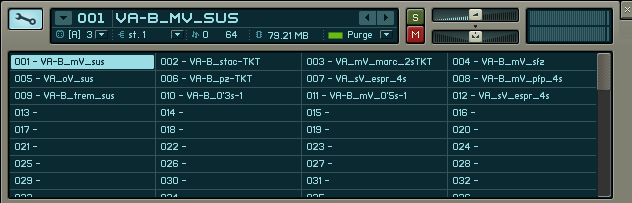
I will use patch change messages in Finale to change articulations as the score plays back. Some sounds have keyswitch patch changes (triggered by MIDI notes outside the range of the instrument). If I use these, I put the keyswitches in a lower layer in Finale and then tell Finale to hide that layer. It works pretty well, but I think I am moving towards instrument banks and patch changes more permanently. More on that in an upcoming post.
So once I have the instrument banks loaded, I’ll be ready to start sketching. I’ll keep you posted.
In the mean time, you might like to listen to a couple of orchestral sketches that started life in Finale and then got detailed programming in Digital Performer:
http://damonsink.com/mp3/Arches_sketch2.mp3
http://damonsink.com/mp3/Arches_sketch3.mp3
These are almost all East West Platinum ProXP sounds
Damon
The Studio Files Team
Comments»
no comments yet - be the first?