Some Popular Mixing Techniques/Effects February 5, 2008
Posted by ConnorSmith in : Digital home recording studios, Logic Studio 8, Mixing , trackbackEver wonder how to get that distorted “old record player sound” on your drum mix, or that “AM radio” effect on your voice? Although there are many different ways of achieving those sounds, here is a short guide on how to start exploring these sonic gems. These may be “cliche”… but they are cliche for one reason: they work!
1) The “AM Radio” Effect – There are many different ways to do this, but I will just cover a few. One very common way is to insert an EQ on the track (or bus) that you want to be affected (no pun intended). With that EQ, engage the hi- and lo-passfilters. Start by setting the hi-pass at around 12dB/octave and at 400Hz. Set the lo-pass to 12dB/octave and put it around 3-4kHz. Now take another band of the EQ and have it do a wide boost around 1-2kHz. Voilá! To get a stronger effect, try filtering out more high and low frequencies, as well as boosting the mids more.
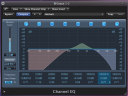
AM Radio settings in Logic 8
2) The Ol’ Record Player – The “record player” sound is also a very popular choice (especially for the start and end sections of tracks/CDs). To a certain extent, you can achieve it through equalization. However, I would highly recommend downloading iZotope Vinyl. This is an amazing plug-in (and its free!). You can dial in the amount of wear on the record, mechanical noise, scratches, etc etc… You can even change the year in which the record player was made. Awesome stuff!
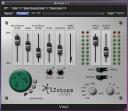
Izotope Vinyl plug-in
3) The “I’m listening through the wall” effect – This is a popular effect to try on drums, guitars, or anything. It is commonly used before a big chorus or intro hits (maybe four bars with the effect on, and then WHAM! the song comes in!). Start by placing an EQ on the track or bus you want to affect. Engage a lo-pass filter and cut out high frequencies (I would start with 12dB/octave and maybe cut around 2k). Then take another band, and try boosting around 250Hz. With this effect, you will really need to play with the frequency and gain levels of the EQ to tailor it to exactly how you want. Also, try using a send to generate a little reverb (maybe use a short room ~1-1.5 sec reverb) on the track. Again, this will get you started, just use your ears and play around with it.
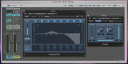
“Playing in the next room”
Try these out, see how you like them. There are many different ways to achieve such effects, but this will get you started. Also, if you have questions about these, or need to learn how to perform other techniques, please email me or post in the comments here.C
Comments»
good stuff. How do you achieve that “this vocal used to be out of tune, but isn’t anymore” effect?

Well, there are a few ways to tune up your vocals. Some are free, some are not. Depending on what DAW you are using, pitch correction may already be available.
In Digital Performer (starting in version 5 I believe), in the “Sequence” window, there is a drop down menu for each track. Normally its labeled “soundbites” if my memory serves me correctly. If you click that and select “Pitch”, the pitch correction view will appear. From there you can draw, drag, and drop pitches based on each note. Make sure to zoom in to get the most accurate results.
In Pro Tools (and other most every other DAW) you can achieve pitch correction manually. You will have to use an audiosuite plug-in. This process is destructive, so I would suggest duplicating the playlist/take before starting. Once you made a copy, you will have to go word by word (assuming you are tuning a vocal). Use the “B” key to seperate a region you want to tune. Then, using your ears, figure out whether or not the note is flat or sharp. Highlight the region, and choose “pitch” out of the audiosuite menu. Then make the proper adjustments and process!
Phew, kind of a lot to read and apply. I will try to make a short screencap video of this process in at least a few different DAWs and post it here soon. Its a great technique.
You can also buy tuning plug-ins (AutoTune, Waves Tune, Melodyne, etc etc). I would suggest practicing a little without the plug-ins first though. A well-trained ear is an invaluable tool!